Think AI Is Only for Big Companies? Think Again!
If you’re creating content for a Business meet, YouTube channel, or small business, you might be seriously underestimating how much AI can help you. And the best part? You don’t need a huge budget, a tech team, or expensive software subscriptions. Today, there are dozens of powerful free Vs premium AI tools that write, design, code, edit videos, generate ideas, and even manage your workflow — many of them free or incredibly cheap.
But here’s the catch:
“Free” doesn’t always mean unlimited, and not every tool is worth your time.
That’s why I’ve put together this friendly, no-nonsense guide breaking down 30+ AI tools — what they offer for free, where the limits are, and exactly when it makes sense to upgrade.
If you’re ready to save money, speed up your work, and level up your entire content game…
you’re going to love this post. Let’s dive in! 🚀
Two Types of “Free” AI Tools (And Why It Matters Before You Start Using Them)
Before you dive into the world of AI, it’s super important to know that “free” doesn’t always mean the same thing. There are actually two kinds of free tools, and understanding the difference can save you time, frustration, and even money.
Understanding the differences between free Vs premium AI tools is crucial for making informed decisions.
1. Completely Free (Open-Source)
These are the true free tools — no subscriptions, no hidden limits, no “upgrade now” pop-ups. You can use them as much as you want.
Examples include:
- Stable Diffusion for image generation
- DuckDuckGo AI Chat for private conversations
Why people love them:
✔ Unlimited usage
✔ Strong privacy
✔ No account required
What’s the catch?
You may need to install software, download models, or have a decent computer — especially for image or video tools. They give you freedom but sometimes require a little setup or tech comfort.
2. Freemium (Free, but With Limits)
This is the most common type — and honestly, it’s where most beginners feel right at home.
Popular tools like:
- ChatGPT
- Canva
- Grammarly
Why people love them:
✔ Super easy to use
✔ Clean, beginner-friendly interfaces
✔ High-quality results
Where the limits show up:
You usually get a set number of tasks, queries, credits, or exports each month. When you hit that limit, you either:
⏳ wait for next month, or
💳 Upgrade to a paid plan
These tools are perfect if you want quick results without touching any technical setup.
completely Free AI Tools (No cost-no limits)
These tools won’t charge you a monthly fee. Some need a bit of tech know-how, but the payoff is total freedom.
For Making Images & Graphics
- Stable Diffusion – Create unlimited images from text descriptions; runs on your computer (needs a decent graphics card in your PC).
- Recraft – Make logos, icons, and illustrations that look crisp at any size; free with some limits on commercial projects.
- Namecheap Logo Maker – Get logo ideas fast; free to browse, pay only if you buy a domain package.
For Coding Help
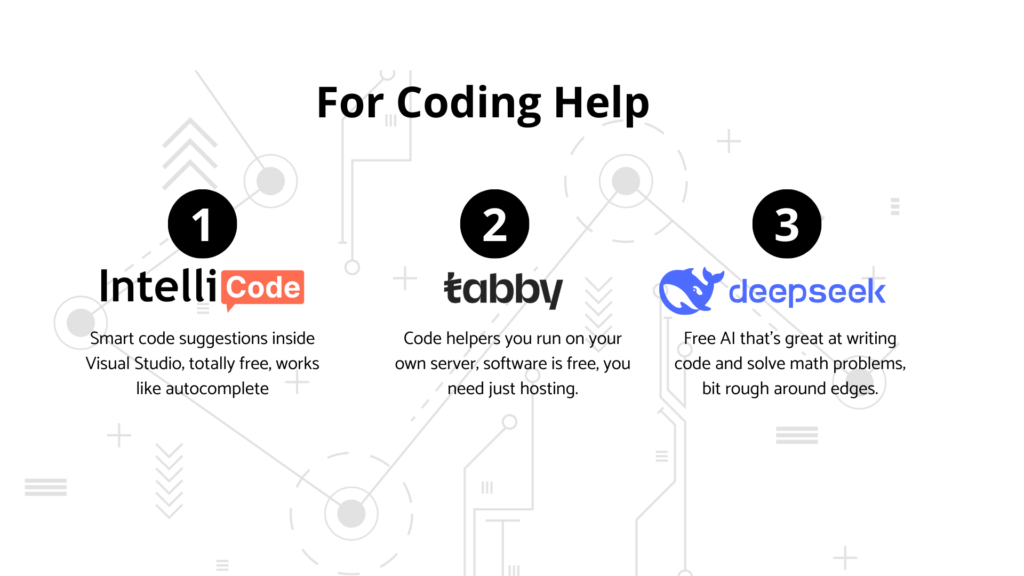
- IntelliCode (Microsoft) –A super helpful coding buddy built right into Visual Studio! It gives smart, real-time suggestions just like an upgraded autocomplete — and the best part? It’s completely free.
- Tabby / FauxPilot – These are awesome open-source code assistants you can run on your own server. The tools themselves are free; you just need a place to host them. Great if you love full control!
- DeepSeek –A powerful free AI that’s surprisingly good at coding and solving math problems. It’s fast and capable, though still a little rough in some areas.
For Research & Chat
- DuckDuckGo AI Chat – Ask questions without being tracked; completely private and free.
- Meta AI – Built into Facebook, Instagram, WhatsApp; free for everyone.
- Pi – Friendly AI designed for emotional support and empathetic chats.
- Le Chat Mistral – Good at multiple languages and complex thinking.
For Presentations & Video
- Canva AI Video Upscaler – Make blurry videos clearer; free with some quality limits.
- Slidesgo AI Presentation Maker – Type what you need, get a full slide deck; free with basic exports.
Freemium Chat & Research Tools
These give you powerful AI on the free plan, but serious users usually need to upgrade.
ChatGPT(By Open AI)
- Free Plan: You get access to GPT-4o mini and a little bit of GPT-4o. Great for everyday chats and quick help.
- Paid Plan: ChatGPT Plus is about ₹1,999/month (~$20–24). You unlock a lot more — tons of messages, faster replies, file uploads, image generation, and even video features.
- Free Plan Limits: On the free tier, you get fewer messages each day, responses can be slower, and some advanced features stay locked.
Gemini (by Google)
- Free Plan: Gemini Flash for everyday queries.
- Paid Plan: Gemini Advanced (~₹1,950/month) with stronger models (Currently GEMINI 3.0) plus 2TB Google Drive storage. Pro plan of Google Gemini
₹35,100FREE for 18 months for Jio users. - Free Limits: Limited memory and weaker handling of long or complex documents.
Perplexity
- Free Plan: You can make unlimited quick searches, but deep research is limited.
- Paid Plan: The Pro plan (about ₹1,999/month) unlocks unlimited research mode and lets you generate images too. In India, it is free for one year for AIRTEL users.
- Free Limits: You can’t run a lot of heavy, detailed research queries each day.
Grok (by x AI)
- Free Plan: Access is very limited — just enough to get a small taste of the platform.
- Paid Plan: Premium starts at about ₹700/month, while Premium+ (₹1,600–1,800/month) gives you the latest Grok models and AI image generation.
- Free Limits: Mostly just a basic trial experience.
Claude (by Anthropic)
- Free Plan: Simple chat with a daily message cap.
- Paid Plan: Claude Pro (around ₹1,999/month) gives you many more messages and supports much longer, richer conversations.
- Free Limits: If you use it often, you’ll run into the message limit pretty quickly.
NotebookLM (by Google)
- What it does: NotebookLM is Google’s AI research assistant that helps you understand and work with your own documents, notes, and sources.
- Free plan: Completely free to use—upload your PDFs, notes, and research materials, and it creates summaries, answers questions, and even generates podcast-style audio discussions about your content.
- Best for: Students, researchers, content creators, and bloggers who need to analyze multiple documents, extract insights, or create study guides from their own materials.
- Free limits: Works amazingly well for free; main limitation is the number of sources you can upload per notebook.
- Why use it: Perfect for turning complex research into blog posts, creating study materials, or understanding technical documents without reading everything line-by-line.
Writing & Editing Tools
Great for bloggers and content creators. Free works for light use, but heavy writers need premium.
Grammarly
- Free plan: Fixes spelling, grammar, basic clarity.
- Paid plan: Premium around $12/month; rewrites sentences, adjusts tone, checks plagiarism.
- Free limits: No help with style, tone, or making your writing sound professional.
QuillBot Paraphraser
- Free plan: Rewrite up to 125 words at a time.
- Paid plan: ~$9.95/month for unlimited words and all rewriting styles.
- Free limits: 125 words is barely a paragraph—tough for blog posts.
Rytr
- Free plan: 10,000 characters per month for emails, ads, short content.
- Paid plan: ~$9/month for unlimited.
- Free limits: If you write regularly, you’ll run out fast.
Coding & Developer Tools
Perfect for building websites or apps. Free tiers work for solo devs; teams need paid.
Replit + Ghostwriter
- Free plan: Code in the cloud with basic AI help.
- Paid plan: ~$19/user/month with team features and better performance.
- Free limits: Slower and fewer collaboration tools.
Amazon Q Developer
- Free plan: AI code help for Amazon Web Services projects.
- Paid plan: Pro features around $19/user/month for teams and security controls.
- Free limits: Missing team management and advanced settings.
Music, Voice & Audio Tools
Most block commercial use on free plans—if you’re making money with your content, you’ll need to pay.
Suno
- Free plan: 50 credits per day to make songs, but you can’t sell them or use them in paid videos.
- Paid plan: ₹850/month with more credits and commercial rights.
- Free limits: No monetization allowed—big deal for YouTubers and podcasters.
Udio
- Free plan: 100 credits per month, personal use only.
- Paid plan: ~$8/month with commercial license.
- Free limits: Can’t use the music in anything you sell.
ElevenLabs (AI Voices)
Free limits: Not enough for weekly podcasts or voiceovers, and you can’t monetize.
Free plan: 10,000 characters per month, non-commercial.
Paid plan: Starter ~$5/month (30,000 characters + commercial use); Creator ~$22/month (100,000 characters), monetization allowed for Youtubers and Podcasters.
Meeting, Video & Presentation Tools
These boost productivity big time. Free is fine for casual use, but pros and teams benefit from paid.
Otter.ai
- Free plan: 300 minutes of meeting transcription per month.
- Paid plan: Pro ~$8.33/month (1,200 minutes); Business ~$19.99 /user/month with team sharing.
- Free limits: 300 minutes is about 5-6 hours—runs out quick if you have lots of meetings.
Fathom
- Free plan: Record unlimited calls for yourself on Zoom, Meet, or Teams.
- Paid plan: ~$16/month for AI-generated action items and automation with other apps.
- Free limits: No fancy workflow tools, but recording is unlimited.
Synthesia (AI Video Avatars)
- Free plan: Just a tiny trial to test it.
- Paid plan: Starts around $18/month with limited video minutes per year.
- Free limits: Can barely export anything on free.
Gamma (AI Presentations)
- What it does: Gamma is an AI-powered presentation builder that creates entire slide decks, documents, and webpages from a simple text prompt, handling all the design and formatting automatically.
- Free plan: 400 AI credits with Gamma branding on your presentations.
- Paid plan: Plus ~₹500/user/month (unlimited AI creation, no branding); Pro ~₹1300/user/month (adds analytics and advanced features).
- Best for: Bloggers who need quick slide decks for webinars, coaches creating client presentations, or anyone who hates designing slides from scratch.
- Why use it: Type what you want to present, pick a style, and Gamma builds the whole deck in minutes—way faster than PowerPoint or Google Slides.
Design & Visual Creation Tools
Leonardo AI
- Free plan: 150 tokens per day to make game art and cool visuals.
- Paid plan: Apprentice ~$10/month (8,500 tokens); Artisan ~$24/month (25,000 tokens).
- Free limits: Daily cap means you can’t batch-create lots of images at once.
Canva Magic Studio
- Free plan: Limited AI features like Magic Write and background removal.
- Paid plan: Canva Pro ~₹500/month with unlimited AI tools and premium templates.
- Free limits: Fewer templates, branding on downloads, fewer AI actions.
Adobe Firefly
- Free plan: 25 credits per month with watermarks on your images.
- Paid plan: ~$4.99/month for 100 credits, no watermark.
- Free limits: 25 credits disappear fast, and watermarks ruin commercial work.
When Should You Upgrade?
Stick with free when you’re just starting out or creating content occasionally. Go paid when:
- You hit the limits every month – If you’re constantly running out of characters, tokens, or minutes, it’s a clear sign you need a bigger plan.
- You need commercial rights – Free plans from tools like Suno, Udio, or ElevenLabs usually block monetization, so paid plans are a must if you want to earn from your content.
- Watermarks hurt your brand – If you work with clients or post professional content, those free-plan logos and watermarks can really hold you back.
- Time is money – Faster processing, better models, and priority access save hours—especially if creating content is part of your daily grind.
- You need team features – Collaboration, sharing, and automated workflows usually unlock only on paid plans.
Frequently Asked Questions (FAQs)
Are free AI tools enough for serious blogging and content creation?
Yes, free AI tools work great when you’re starting out or creating content occasionally. Once you publish regularly, work with clients, or need commercial rights for monetized content, you’ll probably need to upgrade a few key tools.
Which AI tools should a beginner blogger start with (all free)?
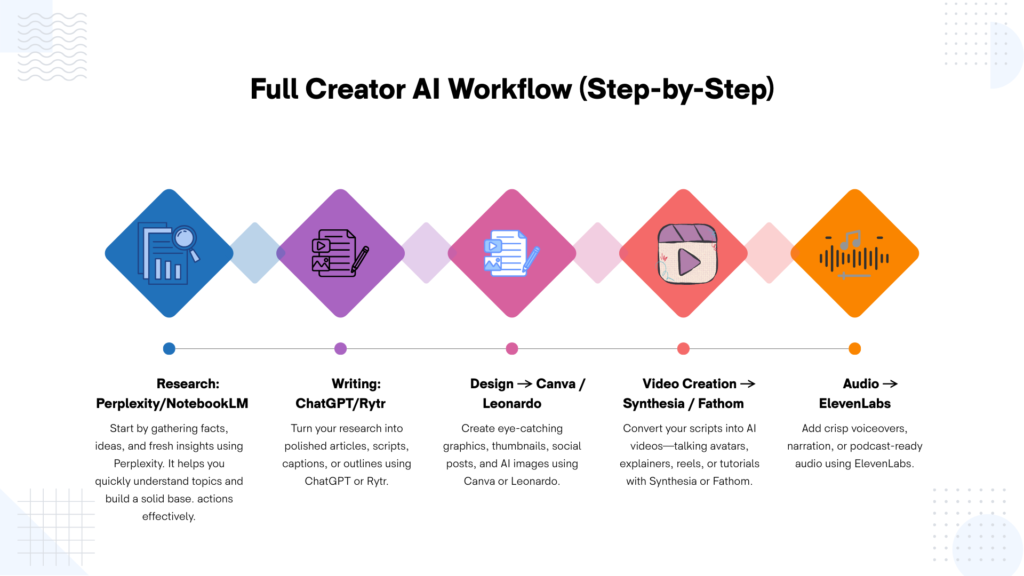
Start with ChatGPT or Gemini for writing, Grammarly for grammar checks, Canva for graphics, and NotebookLM for research. This combo covers the complete content creation workflow without spending a rupee.
When is it worth upgrading to paid AI tools?
Upgrade when you hit monthly limits every time, need commercial rights for monetized content, or when watermarks/branding hurt your professional image. Basically, pay only when the tool directly makes or saves you money.
What’s the difference between open-source “free forever” tools and freemium tools?
Open-source tools are completely free with unlimited use but need technical setup and good hardware. Freemium tools are super easy to use in the cloud but have monthly caps and push you to upgrade eventually.
How can I choose the right mix of free and premium AI tools?
Map your workflow (research, writing, design, audio, video), use free tools everywhere first, then upgrade only the 1-2 tools that directly boost your income or save tons of time. Most creators do fine with 80% free tools and 2-3 smart paid subscriptions.